

鼠标移标题高亮显示对应内容,详解 setAttribute 与 getAttribute 用法
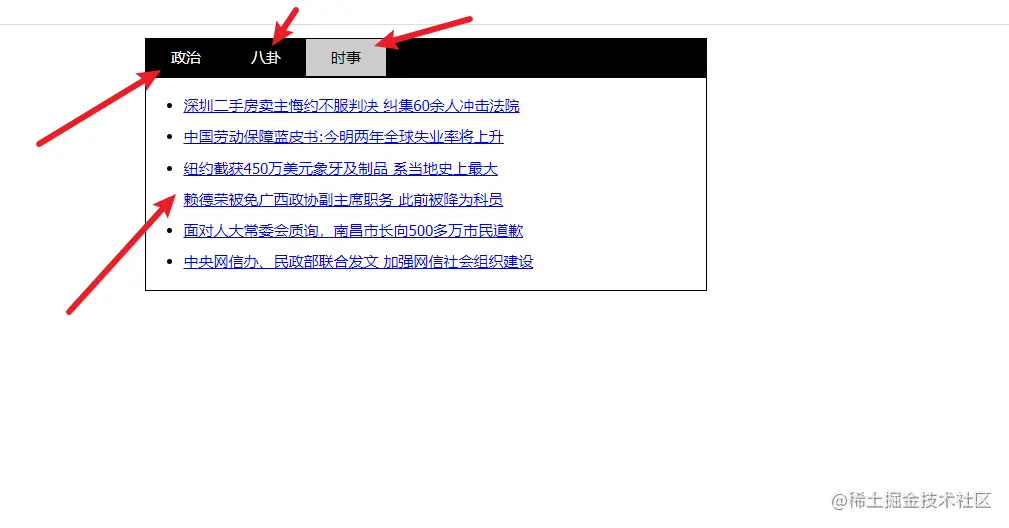
如上图,需要做到鼠标移入对应的标题,标题高亮,然后标题对应的内容显示。
setAttribute() 是用于设置自定义属性的方法,有两个参数,第一个是属性名,第二个是属性值,添加时必须用引号括起来.
比如.setaAttribute("index",i)意思把这个i保存成index,要用的时候可以获取到
getAttribute 方法用于拿到设置的自定义属性的属性值,唯一一个参数就是搜索的自定义属性名(也要用引号包起来):
onmouseenter和onmouseover都是鼠标移入,但是如果是移入ul下面有多个li,onmouserenter可以阻止事件冒泡,不用事件委托的方式来处理同时移入多个li
ommouseover,意思移入ul就是同时移入了多个li,需要用事件委托来处理。e.target
<html>
<head>
<meta http-equiv="Content-Type" content="text/html; charset=utf-8" />
<title>简易选项卡title>
<style>
body,
ul,
li {
margin: 0;
padding: 0;
}
body {
font: 12px/1.5 Tahoma;
}
/* 居中 */
#outer {
width: 450px;
margin: 10px auto;
}
#tab {
/* 超出部分隐藏 */
overflow: hidden;
zoom: 1;
background: #000;
border: 1px solid #000;
}
#tab li {
float: left;
color: #fff;
height: 30px;
cursor: pointer;
line-height: 30px;
list-style-type: none;
padding: 0 20px;
}
/* 给li加个类 */
#tab li.current {
color: #000;
background: #ccc;
}
#content {
border: 1px solid #000;
border-top-width: 0;
}
#content ul {
line-height: 25px;
display: none;
margin: 0 30px;
padding: 10px 0;
}
style>
head>